
We can write two types of test Cases:
1) Positive Test Cases
2) Negative Test Cases
I. Positive Test Cases
A) Test Cases for Email/Phone Box
1) Verify that Email/Phone Box must be available
2) Verify that Email/Phone Box must be clickable
3) Verify that Email/Phone Box must be Informative (Email or phone)
4) Verify that Email/phone should not start with blank or contain any symbols
5) Verify that the where is the cursor focus in text area as Facebook login page load
6) Verify that Email should contain letters and numbers.
7) Verify that Email/Phone should not be left blank.
8) Verify that Email/phone should not be more than 40 characters.
9) Verify that if user enter the email in Email/Phone Box then email must contain @.
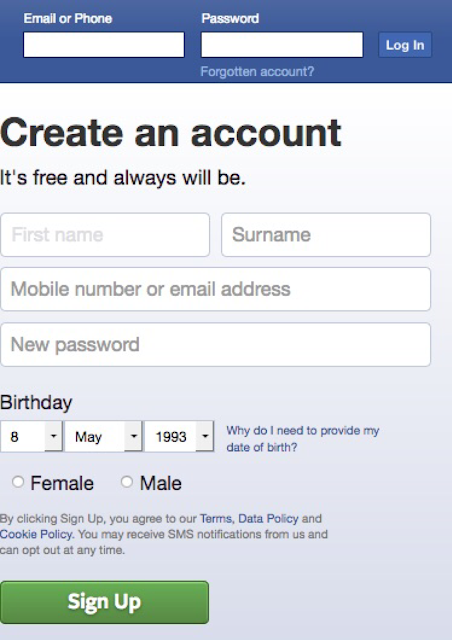
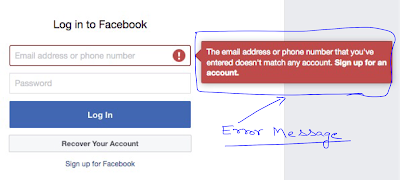
10) Verify that if user hit the Log In Button without enter Email/Phone then there must be an error message that “The email address or phone number that you’ve entered doesn’t match any account”
11) Verify that if user hit the Log In Button without enter Email/Phone then the error screen should be like this:
A) Test Cases for Password
1) Verify that Password Field must be available
2) Verify that User Password Field must be clickable
3) Verify that User Password Field must be Informative.
4) Verify that Password length must be at least 8 characters.
5) Verify that Password must be masked.
6) Verify that Password length should not be more than 40 characters.
7) Verify that Password must contain combination of letter, numbers and symbols.
8) Verify that Password should not contain any space.
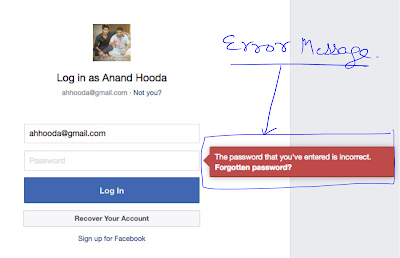
9) Verify that if user hit the Log In Button without enter Password then there must be an error message that “The password that you’ve entered is incorrect”.
10) Verify that if user hit the Log In Button without enter Password then the error screen should be like this:
11) Verify that if user enter the correct password here and hit the login button then user must be login on Facebook.
12) Verify that if user don’t remember that then Recover your account button must be available.
13) Verify “Recover your account” button must be clickable.
14) Verify that as user click on “Recover your account” button, then following screen must be open:
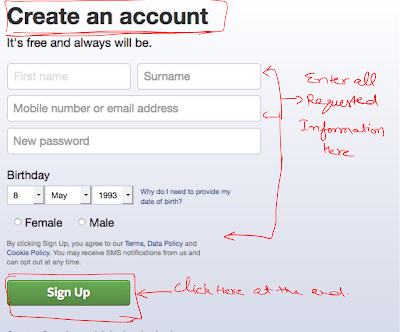
15) Verify that all following options(radio button selection) are available on this screen or not :
a) Use my Google account
b) Send code via email
c) Send code via SMS
16) Verify that if user select any option and click on continue, then further process will be initiated. For example user select “send code via email” and click on continue button then following screen should be there:
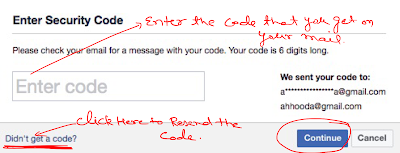
17) Verify that “Didn’t get a code?” hyperlink is available and clickable
18) Verify that as user click on Didn’t get a code?” hyperlink, then user must move on radio button selection page:
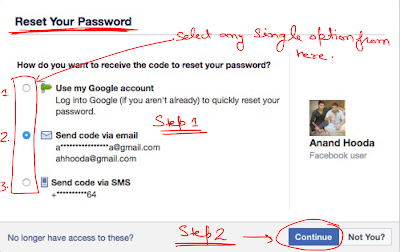
19) Verify that Enter code text box is available and clickable.
20) Verify that continue button here is available and clickable.
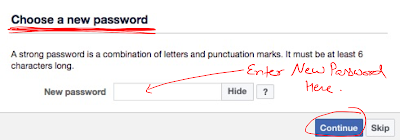
21) Verify that as user enter the code in the box and click on continue, then following screen must be open. When user click on continue button after enter new password, then new password must be set.
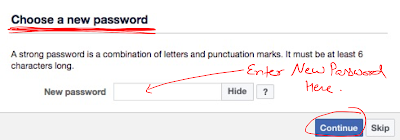
B) Test Cases on “Log In” Button
1) Verify that Log In button must be available
2) Verify that Log In button must be clickable
3) Verify that Log In button must be Informative (Email or phone)
C) Test Cases on “Forgotten account” Link
1) Verify that Forgot account Link is available or not
2) Verify that Forgot account Link is clickable or not or not
3) Verify that as you drag your mouse to this Forgot account Link the arrow symbol must be convert in to hand symbol.
4) Verify that as user click on “Forgot account” Link, then following screen must be open:
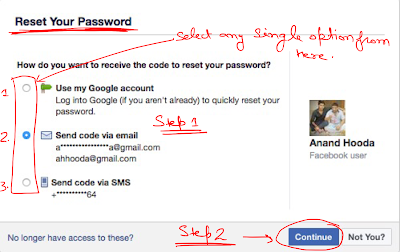
5) Verify that all following options(radio button selection) are available on this screen or not :
a) Use my Google account
b) Send code via email
c) Send code via SMS
6) Verify that if user select any option and click on continue, then further process will be initiated. For example user select “send code via email” and click on continue button then following screen should be there:
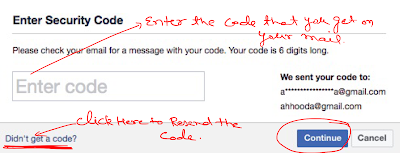
7) Verify that “Didn’t get a code?” hyperlink is available and clickable
8) Verify that as user click on Didn’t get a code?” hyperlink, then user must move on radio button selection page:
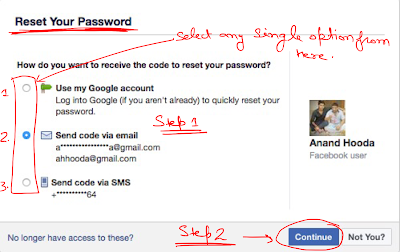
9) Verify that Enter code text box is available and clickable.
10) Verify that continue button here is available and clickable.
11) Verify that as user enter the code in the box and click on continue, then following screen must be open. When user click on continue button after enter new password, then new password must be set.
D) Few Points that we must Test:
1) Verify that all Hyperlinks given on the page is active or not
2) Verify that how the Login screen show on mobile or tablet screen?
3) Verify that can we use Enter key as Sign In(Next) button action?
4) Verify that look and feel must be good.
II. Negative Test Cases
1) Verify that with valid username and invalid password are we able to login
2) Verify that with Invalid username and valid password are we able to login
3) Verify that as we hit the Login Button without entering User name.
4) Verify that as we hit the Login Button without entering Password.
5) Verify that as we hit the Login Button without entering User name and Password.